
Download Patriot NG – System Monitor, Windows Utility, PC Health Check, System Integrity, Registry Monitor, Security Tool
Overview
Patriot NG es una utilidad del sistema diseñada para monitorizar la salud e integridad de los equipos con Windows. La aplicación se centra en detectar cambios en componentes críticos del sistema, ayudando a los usuarios a mantener un entorno informático seguro y estable. Al rastrear modificaciones en claves del registro, archivos host, cuentas de usuario y nuevos servicios, Patriot NG actúa como una herramienta proactiva para identificar posibles amenazas o alteraciones no autorizadas. Esto lo hace particularmente útil para usuarios preocupados por la seguridad del sistema, especialmente aquellos que gestionan datos sensibles o operan en entornos digitales de alto riesgo.
La aplicación está estructurada para apoyar a usuarios con diferentes niveles de habilidad técnica, ofreciendo modos de escaneo regular y experto. Este enfoque de doble nivel garantiza accesibilidad para usuarios ocasionales mientras brinda capacidades avanzadas para personas más experimentadas. Ya sea usado para mantenimiento rutinario o diagnósticos profundos, Patriot NG busca ofrecer información procesable sobre el comportamiento del sistema. Su diseño liviano, de solo 1,8 MB, refleja un enfoque en la eficiencia y el consumo mínimo de recursos.
Aunque el desarrollador no proporcionó detalles técnicos adicionales sobre la arquitectura o los mecanismos subyacentes de la aplicación, su funcionalidad central se basa en la monitorización continua y la generación de alertas. La aplicación no parece requerir instalación, lo que sugiere un modelo de ejecución portátil o independiente. Esto se alinea con su propósito como una utilidad ligera para comprobaciones del sistema bajo demanda. Dada su fecha de lanzamiento en 2011, Patriot NG representa un ejemplo temprano de herramientas de integridad del sistema impulsadas por el usuario en el ecosistema Windows, enfatizando la transparencia y el control del usuario.
Key Features & Functionality
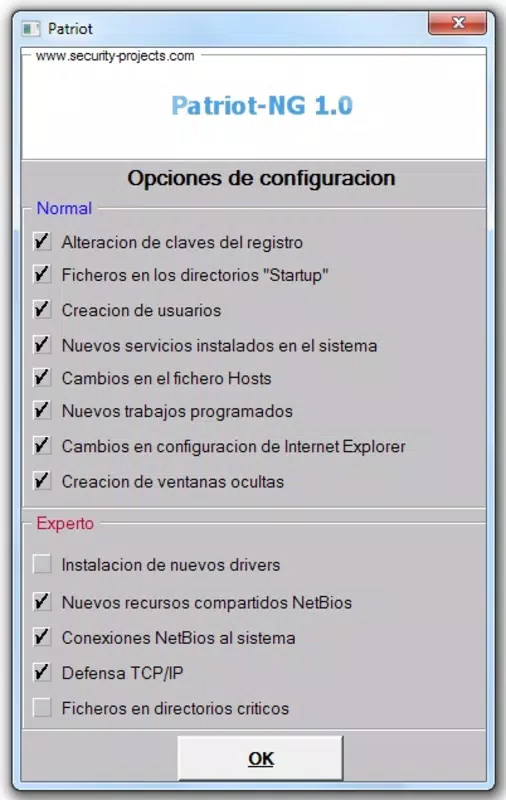
- Customizable Scan Process: Users can define which system elements to monitor during a scan. This includes the ability to include or exclude specific registry keys, user accounts, or service entries, allowing for targeted analysis based on individual needs.
- Dual Levels of Analysis: The application supports two distinct scanning modes—regular and expert. Regular mode provides a high-level overview suitable for everyday users, while expert mode enables in-depth inspection of drivers, TCP/IP configurations, and file changes in protected directories.
- Thorough System Monitoring: Patriot NG continuously tracks changes in essential system components such as the Windows registry, host files, new services, and user accounts. This helps detect anomalies that could indicate malware activity or unauthorized access.
- Expert-Level Protections: In expert mode, the tool offers advanced monitoring, including real-time detection of new drivers, protection against TCP/IP manipulation, and file integrity checks in critical system folders.
- User-Friendly Alerts: When a change is detected, the app issues clear, descriptive alerts. These notifications inform users about the nature of the change, enabling prompt investigation and response.
For example, a user might run a regular scan before installing new software to ensure no hidden modifications have been made. In another scenario, an IT professional could use expert mode to audit system changes after a suspected security breach. The customizable nature of the scan process allows for tailored workflows, making the app adaptable across different use cases.
Interface, UX & Performance
Patriot NG features a straightforward interface designed for functionality over visual flair. The layout is minimal, with a control panel that organizes scanning options and results in a clear, linear fashion. Navigation is intuitive, relying on direct access to scan modes and monitoring settings without unnecessary layers or menus.
The application’s lightweight footprint—1.8 MB—suggests efficient memory usage and fast startup times. Although the developer did not list formal performance metrics, the app’s small size and lack of installation requirements imply low system overhead. This makes it suitable for older or resource-constrained systems where performance is a concern.
Responsiveness appears to be consistent, with scans completing quickly and alerts appearing in real time. Stability is likely maintained through a focused feature set, avoiding the complexity that often leads to crashes in utility software. However, compatibility with modern Windows versions beyond the original release date is uncertain, as the app was last updated in 2011.
Platform Compatibility & Technical Requirements
Patriot NG is designed for the Windows operating system. The app is available in version 2.5.1 and has a file size of 1.8 MB. It is offered as a free tool, with no cost to download or use.
The developer did not specify minimum OS requirements or compatibility details for newer Windows releases. As such, it is unclear whether the application runs natively on Windows 10, Windows 11, or other recent versions. Users should exercise caution when deploying it on modern systems, particularly those with enhanced security features like UAC or driver signing enforcement.
Given its age, the app may require compatibility mode or elevated privileges to function properly. The lack of a formal installation package suggests a portable execution model, which could simplify deployment across multiple machines.
Pros and Cons
Pros
- Lightweight at just 1.8 MB, ideal for low-resource systems.
- Offers dual scanning modes for both beginners and advanced users.
- Provides customizable scan options for targeted system checks.
- Delivers clear, actionable alerts when changes are detected.
- Free to download and use with no hidden costs.
Cons
- Released in 2011, raising concerns about compatibility with modern Windows versions.
- Developer did not provide technical specifications or system requirements.
- Limited visual design and user interface compared to contemporary tools.
- No official update history or support channel available.
- May not function properly on systems with strict security policies.
FAQ
Is Patriot NG safe to use on my Windows PC?
Patriot NG is designed as a system monitoring tool and does not contain malicious code. However, due to its age and lack of recent updates, it may not be fully compatible with current Windows security features. Users should exercise caution and consider running it in a controlled environment.
Can I install Patriot NG on Windows 10 or Windows 11?
While the app was originally released in 2011, it may run on Windows 10 or 11 through compatibility mode. However, the developer did not confirm support for these platforms. Performance and functionality cannot be guaranteed on newer systems.
Does Patriot NG require an internet connection?
The application does not appear to require an internet connection for core functionality. All monitoring and scanning processes are performed locally on the device.
Is Patriot NG free to download and use?
Yes, Patriot NG is available at no cost. There are no subscription fees, in-app purchases, or premium features.
How often should I run a scan with Patriot NG?
Users can run scans as needed—before installing software, after system updates, or periodically for routine maintenance. The frequency depends on individual risk tolerance and system usage patterns.
Final Thoughts
Patriot NG remains a notable example of early system integrity monitoring tools for Windows. Its dual-mode scanning, customizable options, and lightweight design offer practical value for users seeking insight into their system’s health. While its age presents compatibility challenges, the app continues to serve niche audiences, particularly those managing legacy systems or requiring a no-frills monitoring solution.
For users who prioritize simplicity, control, and security without the overhead of modern bloatware, Patriot NG delivers a focused experience. It is especially suited for technical users who understand the risks of outdated software and are willing to manage them.
Download Patriot NG now


